GEO
robots.txt and AI bots: which to allow and which to block.
Which AI bots train models and which drive visibility in ChatGPT, Claude and Perplexity. Ready-to-copy robots.txt rules and the most common mistakes.
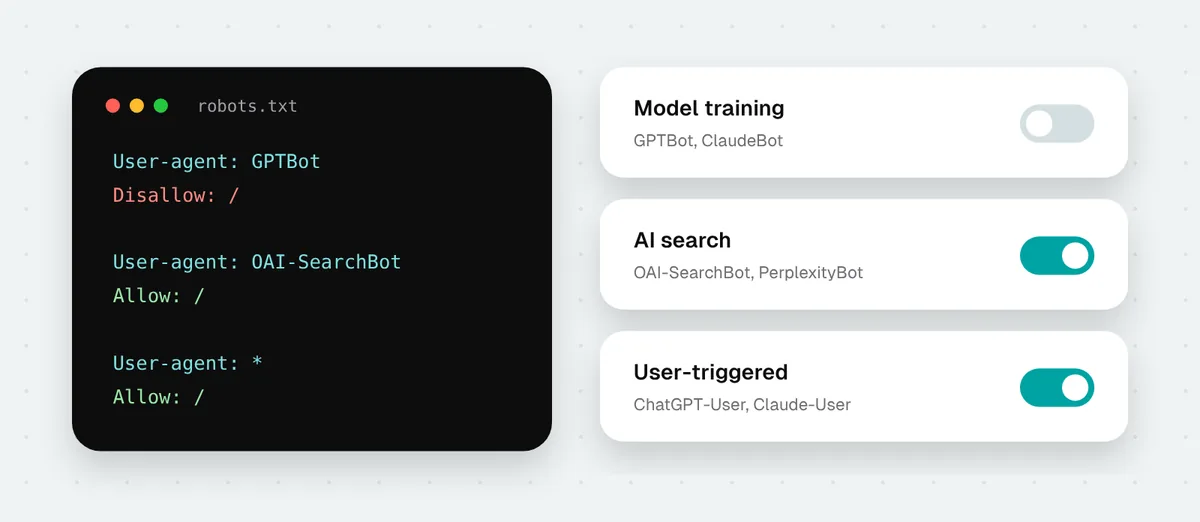
More and more businesses add a block “for AI” to robots.txt because they do not want their content to train models. Often they block something they never meant to: visibility in ChatGPT, Claude or Perplexity search. This happens because “AI bots” covers three different kinds of bots, and each is blocked separately. Below I explain what each bot does and give ready-to-copy rules.
Three kinds of AI bots
- Model training bots. They collect content that future model versions are built from. A block keeps your future content out of training. It does not remove your site from AI search.
- AI search bots. They build the index ChatGPT, Claude or Perplexity draw on for search answers. A block means your site stops appearing there.
- User-triggered bots. They open a page when someone asks a chat to check a specific address or when the tool looks up an answer live. OpenAI and Perplexity say plainly that such bots may ignore robots.txt, because a person requested the fetch.
| Bot | Company | What it does | What a block does |
|---|---|---|---|
| GPTBot | OpenAI | Model training | Content stays out of training. ChatGPT search still works. |
| OAI-SearchBot | OpenAI | ChatGPT search | Your site disappears from ChatGPT search answers, at most remaining as a navigational link. |
| ChatGPT-User | OpenAI | Fetching a page at a user's request | robots.txt rules may not apply. |
| ClaudeBot | Anthropic | Model training | Future content stays out of training. |
| Claude-SearchBot | Anthropic | Search in Claude | Less visibility in Claude search results. |
| Claude-User | Anthropic | Fetching a page at a user's request | Claude will not fetch your page when someone asks about it. |
| PerplexityBot | Perplexity | Perplexity search | Your site stops appearing in Perplexity results. Perplexity says it does not use this bot to train models. |
| Perplexity-User | Perplexity | Fetching a page at a user's request | Generally ignores robots.txt. |
| Google-Extended | Consent to use content for training Gemini | Does not affect Google Search results or AI Overviews. | |
| Applebot-Extended | Apple | Consent to use content for training Apple models | Does not affect Apple search. |
| meta-externalagent | Meta | Collecting content for Meta AI models | Content stays out of Meta model training. |
| CCBot | Common Crawl | A public web archive many AI companies use | Your site will not be included in future Common Crawl datasets. |
What about Google?
Google causes the most confusion. AI Overviews and AI Mode use the same index as regular results, which means Googlebot. Block Googlebot and you disappear from Google altogether, not only from AI answers.
Google-Extended is not a separate crawler but a robots.txt token that tells Google whether it may use your content to train Gemini. According to Google, it does not affect whether or how high your site appears in Search. To exclude your whole site from AI Overviews and AI Mode, Google has offered a separate Search Console setting since 2026. You can limit individual passages with the same settings as regular snippets: nosnippet, data-nosnippet and max-snippet. I compare all these options in AI in Search Console: the new report and switch.
Ready-to-copy rules
Option 1: I want to be visible everywhere
For most service businesses this is the best choice. You block nothing, and AI can know your business and recommend it in answers.
User-agent: *
Allow: /

Sitemap: https://yoursite.com/sitemap.xml
Option 2: AI search yes, model training no
Your site stays visible in ChatGPT, Claude and Perplexity search, but you ask for your content to be kept out of model training.
User-agent: GPTBot
User-agent: ClaudeBot
User-agent: Google-Extended
User-agent: Applebot-Extended
User-agent: CCBot
User-agent: meta-externalagent
Disallow: /

User-agent: *
Allow: /

Sitemap: https://yoursite.com/sitemap.xml
Option 3: I block all AI bots
A deliberate decision, for example for paid content. Your site disappears from AI search but stays in Google, because Googlebot is not blocked. User-triggered bots are listed here, but they may ignore the rule.
User-agent: GPTBot
User-agent: OAI-SearchBot
User-agent: ChatGPT-User
User-agent: ClaudeBot
User-agent: Claude-SearchBot
User-agent: Claude-User
User-agent: PerplexityBot
User-agent: Perplexity-User
User-agent: Google-Extended
User-agent: Applebot-Extended
User-agent: CCBot
User-agent: meta-externalagent
Disallow: /

User-agent: *
Allow: /

Sitemap: https://yoursite.com/sitemap.xml
If your robots.txt already has rules for all bots, such as blocking the admin panel, add them to the groups above too. More on that in the first mistake below.
The most common mistakes
- A separate group for a bot cancels the general rules. A bot with its own group in robots.txt follows only that group and ignores
User-agent: *. If you addUser-agent: GPTBotwith a single rule, GPTBot stops respecting, say, a block on/admin/from the general group. - Blocking “everything AI” from a ready-made list. Lists copied from the internet often mix training bots with search bots. The result: a business disappears from ChatGPT when it only wanted to opt out of training.
- A firewall blocks what robots.txt allows. Cloudflare and some hosting providers have their own AI bot blocking settings and have already changed the defaults for new domains. A bot can be refused access even though robots.txt lets it in. Check the bot settings in your Cloudflare or hosting dashboard.
- Forgotten subdomains. robots.txt only applies to the host it sits on. A shop on
shop.yoursite.comneeds its own file. - A file that is not there. If
/robots.txtreturns an error page with a 200 code or a 5xx server error, bots may interpret it differently. The file should exist and return plain text.
How to check your site
The easiest way is our AI bot checker. Enter an address and the tool shows what robots.txt tells more than a dozen bots and whether the server quietly turns them away even though the file lets them in.
Remember too that most AI bots do not run JavaScript. If your page content only appears after scripts load, a bot may see an almost empty page. You can check this with the raw vs rendered HTML tool.
I write more about getting into AI answers in GEO in practice: getting recommended by ChatGPT, and about measuring AI traffic in ChatGPT and AI traffic in GA4.
Sources
- Overview of OpenAI Crawlers - OpenAI
- Does Anthropic crawl data from the web, and how can site owners block the crawler? - Anthropic
- Perplexity Crawlers - Perplexity
- AI features and your website - Google Search Central
- Control content use for AI training with Cloudflare's managed robots.txt - Cloudflare
Was this article helpful?
Great, glad it helped!
Sorry to hear that. Tell me what was missing and I will improve it: info@outrank.pl
About the author. Maciek - SEO & GEO consultant with 10+ years of experience, formerly Head of SEO at companies including Gemini Polska and Staples Solutions. More about me