GEO
AI in Search Console: the new report and switch. Check before you turn anything off.
Search Console now has a report of impressions in AI Overviews and AI Mode and a setting that excludes your site from them. What the report shows, what the switch does and why most businesses should leave it alone.
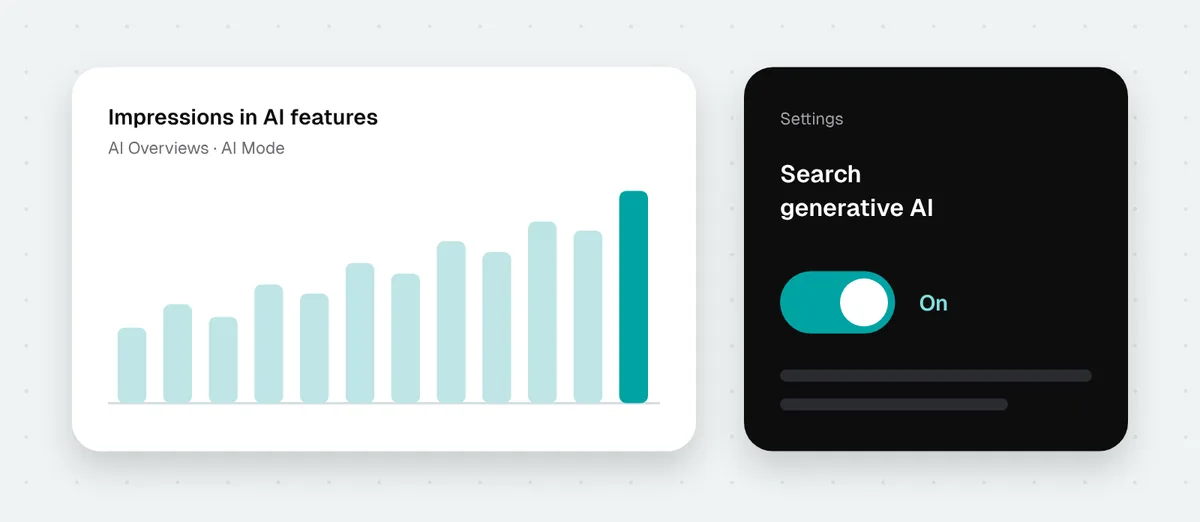
For a long time, site owners had no insight into how Google shows their content in AI Overviews and AI Mode. That has changed. Google first tested the new features in the UK and on 31 August 2026 made them available to all sites worldwide. Search Console now has two new things: a report of impressions in AI features and a setting that excludes your whole site from them. They are worth a look, though for a different reason than the switch suggests.
The report: how often Google AI showed your site
You will find the report in the Performance section, next to the regular search results report. Google calls it the generative AI performance report.
It shows one number: impressions, meaning how many times a link to your site appeared to a user in AI Overviews or AI Mode. You can break them down by:
- pages, meaning which URLs Google AI shows most often,
- countries,
- dates,
- devices: desktop, tablet, mobile.
There is also a search type filter: regular text queries or image search, for example through Google Lens.
What the report does not have: clicks, click-through rate and queries. So you will not learn which questions your site appeared for or how many people clicked. Search Engine Journal reports that click data is expected because of requirements from the UK regulator CMA, but Google has not given a date for all countries. The report may also not appear at all if your site has very few impressions in AI features.
How to read it
The page list is the most useful part. Compare it with the regular Performance report:
- Pages with many AI impressions but few clicks in regular results. Google considers them a good source for answers, but people rarely click through. Check whether the page offers more than what AI has already summarised: pricing, a calculator, a form, a specific offer.
- Important pages missing from the report. If a service page you care about does not appear in AI while similar competitor pages do, the content is probably too general or hard to quote.
- The month-to-month trend. A single day means nothing, because AI answers change constantly. What counts is the direction.
You can only see the traffic these impressions bring indirectly. In GA4, clicks from AI Overviews have the same source as regular Google results. How to separate traffic from ChatGPT, Perplexity and other AI tools is covered in ChatGPT and AI traffic in GA4.
The switch: excluding your site from AI Overviews and AI Mode
The second new option is in Search Console settings, called Search generative AI. It is on by default, meaning your site can appear in AI features.
When you turn it off, according to Google’s documentation:
- links to your site stop appearing in AI Overviews, AI Mode and AI features in Discover,
- content from your site is not used to generate AI answers in these features,
- you get neither impressions nor traffic from them,
- the change usually takes effect within a few days, though some content may take longer to disappear.
What this setting does not do:
- It does not change regular rankings. Google says plainly that it is not a ranking signal for other parts of Search.
- It does not cover model training. That is what Google-Extended in robots.txt is for.
- It does not remove your site from Google. That is what noindex is for.
- It does not work outside Google. ChatGPT, Perplexity and Claude do not see it.
If you have several properties in Search Console, for example a domain and a separate folder or subdomain, the setting is inherited from the parent property. A child property can be set differently, and the domain owner is then notified.
Should you exclude your site from AI Overviews?
For most service businesses, no. A local business’s problem is usually not that AI cites it too often but that AI does not mention it at all. Opting out removes all impressions and links from a place where more and more people look for answers.
There is also some early, very limited data. Cyrus Shepard tested opting out on one of his own sites. AI impressions made up about 8% of all impressions there, and their estimated click-through rate was about 0.9%, which is low. But after opting out, clicks from regular results also fell, and the pages most often shown in AI lost rankings and only recovered after opting back in. It is one site and one comparison, so I would not draw firm conclusions from it. It certainly does not support the idea that opting out pays off.
When is it at least worth considering? Mainly for publishers whose entire value is content that AI summarises so well that nobody needs to visit. Even then, first measure how many AI impressions you have and how traffic changes, and only then decide.
Four ways to control it and what each does
| Setting | What it turns off | What it leaves alone |
|---|---|---|
| Search generative AI in Search Console | Your whole site in AI Overviews, AI Mode and AI features in Discover | Regular results, model training, other AI tools |
| Google-Extended in robots.txt | Use of content for training Gemini and in the Gemini app | Google Search, including AI Overviews |
| nosnippet, data-nosnippet, max-snippet | Selected passages or a whole page as a source for snippets in results and in AI | The page's presence in results, but it also limits the regular snippet under the link |
| noindex | A page in all of Google Search | Nothing remains, the page disappears from Google |
How to set access for other AI tools’ bots is covered in robots.txt and AI bots.
What Google itself says about optimising for AI
Along with the new settings, Google published a guide on preparing a site for AI features in Search. The most interesting part is what Google says you do not need to do:
- llms.txt: Google Search does not use it. The file will not help or hurt in Google, though it may matter for other tools.
- Splitting content into small chunks: not needed. Google understands pages covering several topics, and there is no ideal length.
- Rewriting content for AI: not needed. AI understands synonyms and meaning, so there is no need to stuff phrases.
- Inauthentic brand mentions: they do not help, and spam systems catch them.
- Special structured data for AI: there is none. Structured data still helps with regular rich results.
Google openly calls GEO simply SEO for AI search. The fundamentals have not changed: original content based on first-hand experience, clear structure, a site crawlers can read and up-to-date data in your Google Business Profile. It is a good yardstick for offers selling “special AI optimisation”. More in how to choose a GEO agency.
What to do this week
- In Search Console settings, check that Search generative AI is on, including in child properties if you have any.
- Open the AI report and note the pages with the most impressions.
- Compare them with the regular Performance report and with AI traffic in GA4.
- Come back to the report once a month and check the trend.
If you would like me to do this for you and tell you which pages are worth developing, see the GEO - AI visibility page.
Sources
- New opportunities, control and insights for website owners - Google
- Search generative AI control - Search Console Help
- Generative AI performance report (Search) - Search Console Help
- Google's Guide to Optimizing for Generative AI Features on Google Search - Google Search Central
- What Opting Out Of Google's AI Search Features Means Now - Search Engine Journal
- Google AI Overviews & AI Mode CTR Study - Search Engine Roundtable
Was this article helpful?
Great, glad it helped!
Sorry to hear that. Tell me what was missing and I will improve it: info@outrank.pl
About the author. Maciek - SEO & GEO consultant with 10+ years of experience, formerly Head of SEO at companies including Gemini Polska and Staples Solutions. More about me